Import or record
Choose a local audio file you are allowed to use, or record directly through the microphone.
GigaChords for Android
Import a supported local file or record through the microphone, analyze it on your device, and work with an editable chord map while the music plays. The official Android app is available now on Google Play.
From phone audio to practice
Choose a local audio file you are allowed to use, or record directly through the microphone.
Play the audio while the current and upcoming chords stay visible on the moving chart.
Loop a difficult part, change speed, adjust the capo display, and correct chord cells or timing when your ear disagrees.
Designed for a phone
Use the full editable grid when you need the whole structure, then move to the focused practice view for large current and next chords, instrument diagrams, playback, looping, and speed control.
Explore the full feature set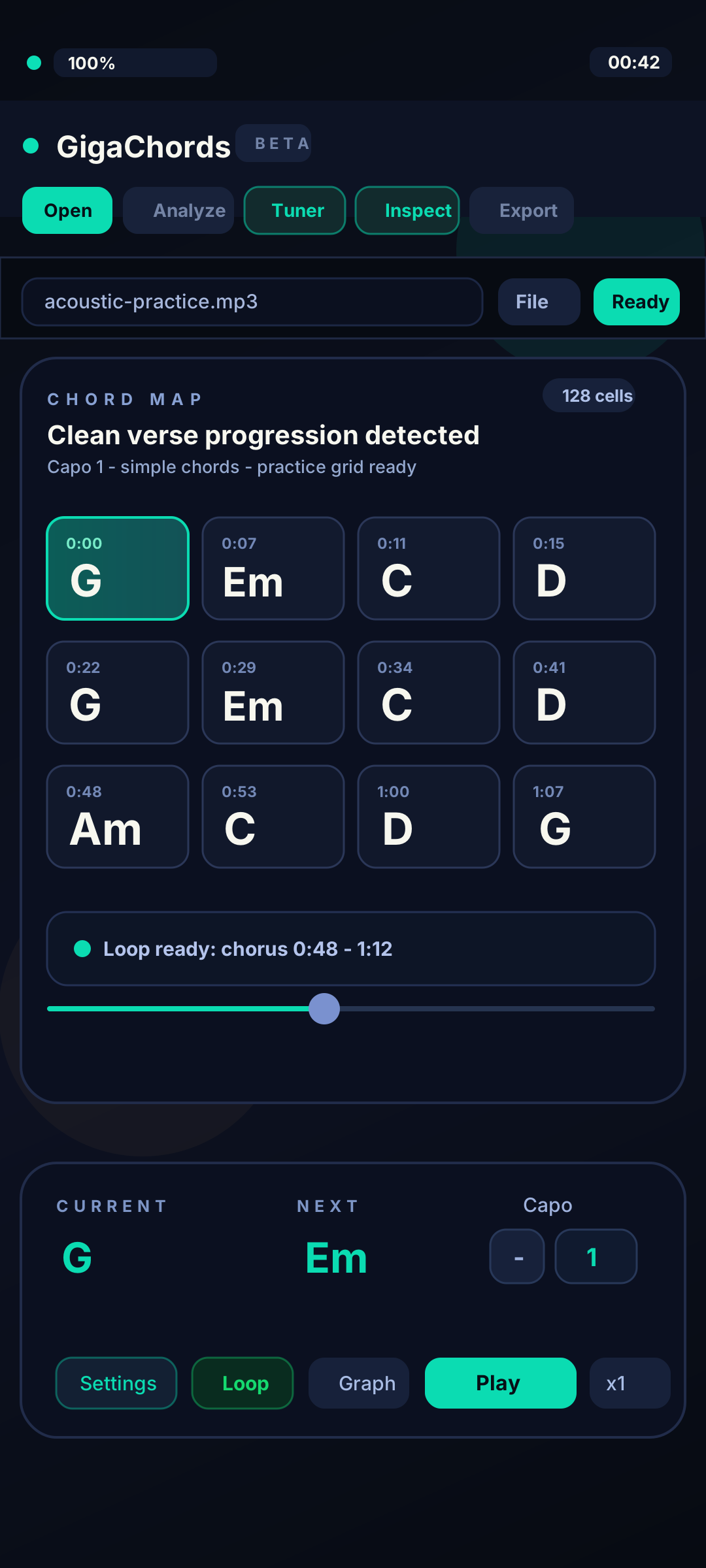
Local-first analysis
Core file and microphone analysis does not require uploading the recording. Network access is used for account sign-in, Google Play subscription verification, app updates, and feedback you explicitly choose to send.
Read the local-first privacy explanationLocal MP3, WAV, M4A, MP4, AAC, OGG, OPUS, FLAC, and WEBM files where device codecs support them, plus microphone recording and saved chord maps.
Online-link import, a public song catalog, iPhone/iPad, and browser analysis are not part of this release.
Install the official public release from Google Play and start free.
Grand Opening
Now live on Microsoft Store + App Store
GigaChords is now available on iPhone, iPad, Windows, and Android. Choose the App Store or Microsoft Store for the two newest releases, or get Android from Google Play.
New: Microsoft Store + App Store